SKSTUDIO / PRODUCT OVERVIEW
Build production-ready test stations faster.
Without rebuilding the foundation.
SKStudio gives test teams a ready-to-run execution foundation—eliminating the boilerplate that slows development and deployment.
Author sequences in human-readable, Git-ready JSON. Run test logic in Python, LabVIEW and C—freely combined in a single workflow. Reporting, cryptographic signing and deployment tools are built in from day one.
One workspace for execution, reporting, traceability and deployment.
SKSTUDIO / PLATFORM OVERVIEW
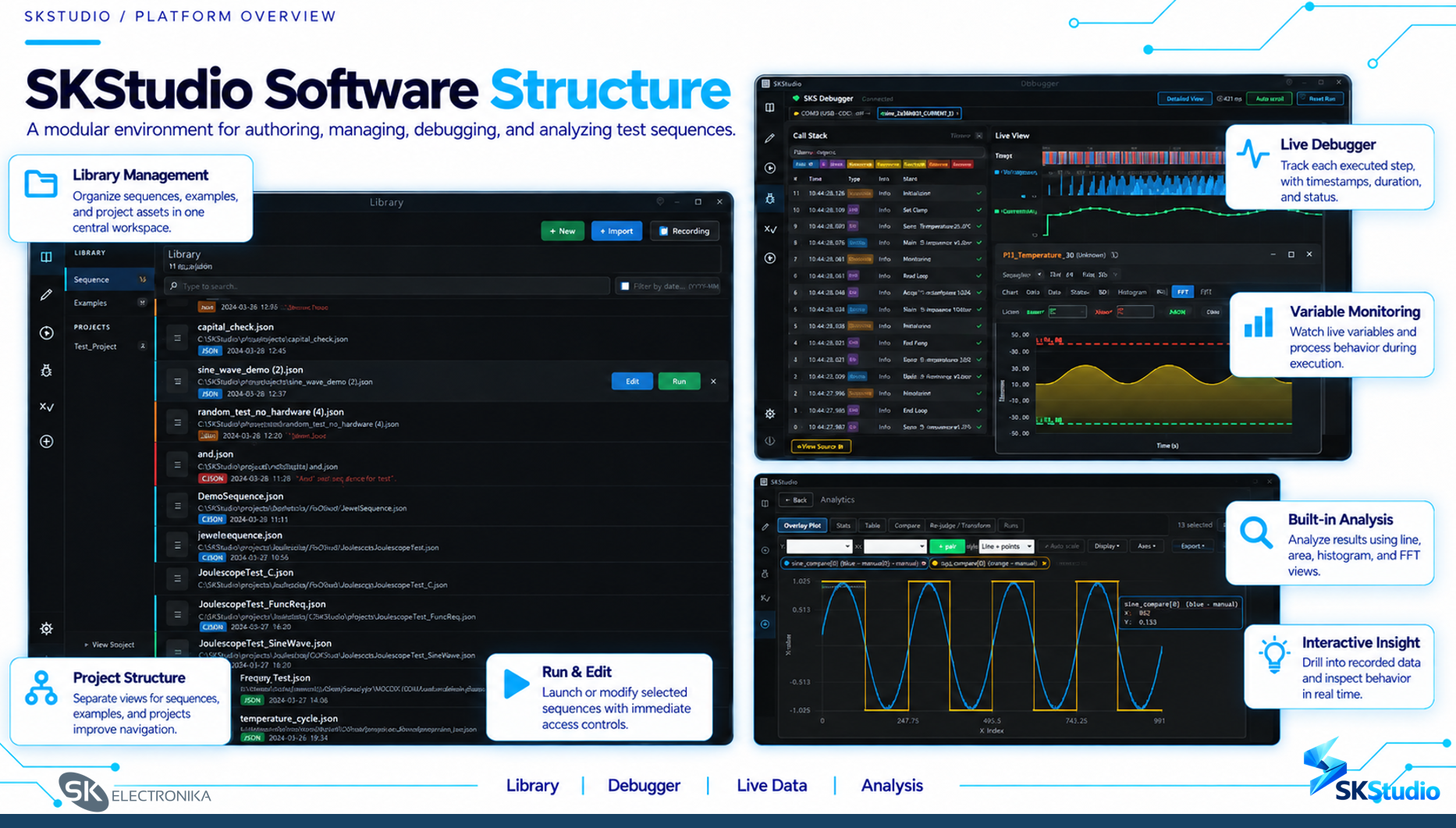
SKStudio Software Structure
A modular environment for authoring, managing, debugging, and analyzing test sequences.
Core Capabilities
— SKStudio in action —
Sequence Authoring
Open JSON sequences: steps, conditions, loops, sub-sequences, variables, parameters and verdicts.
Turn an idea into a structured, readable, maintainable test flow.
Multi-Language Integration
Combine Python functions, C DLL code and LabVIEW VIs in one sequence.
Reuse existing code and equipment; choose the right tool for every task.
Record, Replay & Simulation
Record every run, reproduce faults precisely and simulate without a UUT or connected instruments.
Faster debugging, continuous work beyond the lab, and safer validation before hardware.
Debug, Analysis & Golden Comparison
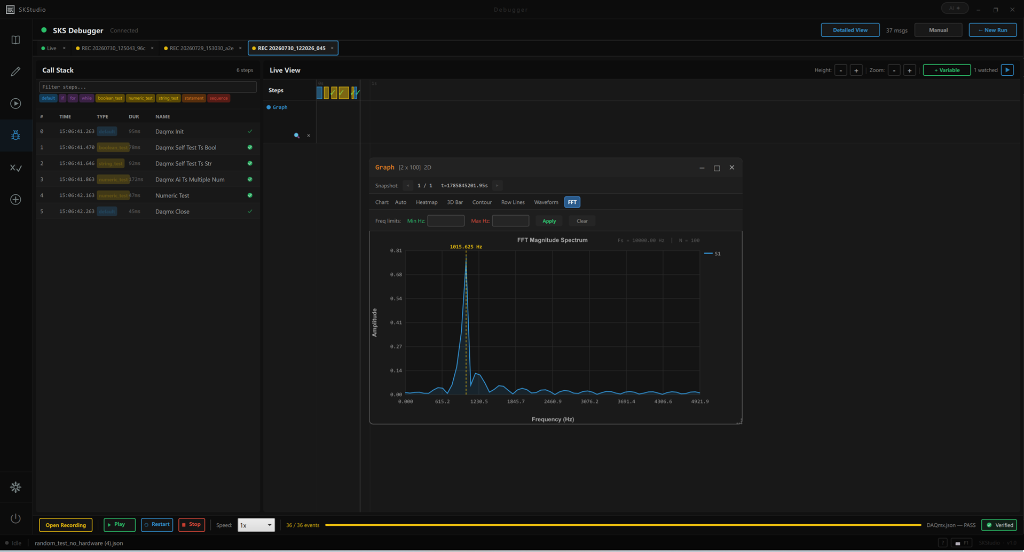
Navigate the event timeline, inspect each step, compare results and run automated Golden Unit Comparison.
Move from a failed test to a clear understanding of the cause and impact.
Reporting & Deployment
Create professional reports, export data, sign sequences and build an independent production release.
A controlled transition from engineering to the production floor.
Top Advantages
Seven structural advantages for modern production test
Mix Python, LabVIEW & C
Use existing code in one sequence
Plain JSON
Git-ready, readable and version controlled
Cryptographic Traceability
Signed sequences and verified recordings
Record, Replay & Simulate
Reproduce runs or validate without hardware
Live Data
Golden Unit Comparison
Automatic reference-based quality control
Factory-Ready Deployment
Self-contained release for production PCs
AI-Native by Design
Documented JSON and CLI for AI-assisted workflows
Everything You Need in One Test Platform
From authoring and hardware integration to analysis, reporting, and deployment.
Engine
Run, Pause, Resume, Stop, Retry, State Machine, Threads, Processes
Editor
JSON Editor, Step Editing, Undo/Redo, Adapter Introspection, AI Editor
Learn
Examples Library, Reference Code, Ready-to-Run Test Examples
Hardware
Adapters: Python, C, LabVIEW Discovery, Timeout, Retry, Typed Data
Testing
Numeric, Boolean, String; Limits, Verdicts, Retry-on-Fail
Replay
Record, Replay, Simulate, Run from Any Step, Provenance Tags
Output
Report Designer, PDF, Preview, JSON Data Export
Analysis
Golden Comparison, Debugger, Plots, Statistics, Diff, Re-judge
Trust
Sequence Signing, Recording Signing, Integrity Check, Sandboxing
Ship
Release Manager, Operator GUI, Standalone Station, Build Log
Integrate
Event Bus, CLI, Licensing, YAML Configuration
Connect
Read Limits, Write Results, SQL, MongoDB Integration
From Test Engineering to Production
SKStudio capabilities embedded at every stage
Test Planning
Examples Library • limits & variables
System Design
Python, C & LabVIEW adapters
Test Development
JSON Editor • flow control • sub-sequences
Execution & Debug
Engine Flow • Debugger • Record/Replay/Simulate
Data Analysis
Golden Unit • analytics • re-judge
Insights & Reporting
Report Suite • PDF • data export
Production Release
Sequence signing • Release Manager • Operator GUI
Plan, build, validate and deploy—without leaving one engineering environment.
SKSTUDIO / PLATFORM OVERVIEW
SKStudio Software Structure
A modular environment for authoring, managing, debugging, and analyzing test sequences.
SKStudio
Library
Browse sequence JSON files, manage projects, and access the Examples Center from a two-pane workspace.
Editor
The sequence authoring surface for building and editing pre-sequence, steps, post-sequence, report-sequence, and post-run phases. Configure adapters, arguments, return data, and simulation settings.
Engine
The run-control workspace for Run, Debug, Pause, Stop, and Replay. Includes live step views, breakpoints, and execution controls.
Debugger
Inspect live and recorded sessions with execution timelines, variable trends, call stack, messages, and session tabs.
Results
Review run history with PASS / FAIL / ERROR verdicts, replay and report actions, and golden-run markers.
Advanced
Access larger tools such as Release Manager and Golden Unit Comparison, with feature availability controlled by license tier.
Settings
Centralized application configuration for Engine, Network, Adapters, Paths, Output, Recording, Auth, Editor, Accessibility, Debugger, AI, and About.
Settings and Logout remain separated from the main module list at the bottom of the rail.
Open architecture. Complete traceability. Production confidence.
Build • Test • Deliver